Smooth Key Scroll
By Smooth Key Scroll
No Rating Available.
Download and install the Smooth Key Scroll extension 2.6.6 for Microsoft edge store. Also, Smooth Key Scroll addons is very helpful for every computer and mobile users Users.

Screenshots:
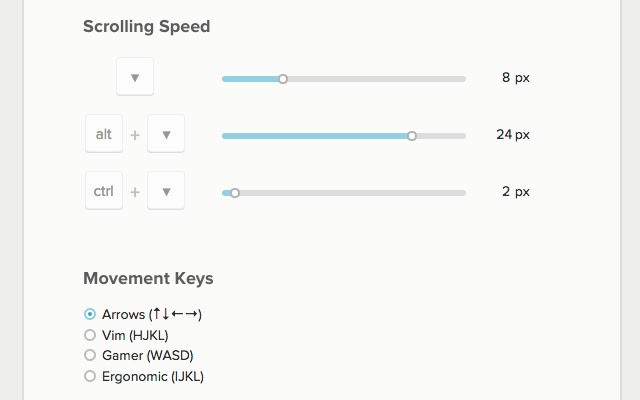

Smooth Key Scroll extension for Edge
Smooth Key Scroll Extension For Microsoft Edge you can help with quality browsers. Day by Day, Microsoft Edge. This guide will help you to download Smooth Key Scroll extension 2.6.6 on their website. Anyway, Smooth Key Scroll is developed by Smooth Key Scroll. First, you must download their Edge browser then this guide will help to install on their browser through the extension.
In the event that you have wanted to download an extension onto the latest version of Microsoft Edge, there is a simple and straightforward course of action. The following steps will enable you to download and install any extensions that you might want to use.
Table of Contents
Download Smooth Key Scroll extension for Microsoft Edge
Edgeaddons.com is the most popular Microsoft Edge browser, an extension free download alternative website. On this website you can download Extensions no need for any Registration. I think you have a better solution to this website. Smooth Key Scroll is the Accessibility category extension in the Microsoft Edge web store.
Anyway, You can understand how to download the free Smooth Key Scroll extension 2.6.6 simply by visiting our website. There are no special technical skills required to save the files on your computer. So what are you waiting for? Go ahead!
Smooth Key Scroll extension Features
Smooth scroll with the keyboard
Smooth Key Scroll enables smooth and responsive scrolling with the keyboard on every page.
– Arrow keys to move arround with adjustable speed
– Control (ctrl) and Option (alt) to modify speed
– Power scrolling keys (vim, gamer, ergonomic)
– Option to disable mouse hover effects
– Option to disable blue arrow from google search
Issues & Suggestions: https://github.com/smoothkeyscroll/issues/issues
Changes
——-
v2.6.6
– Really remove hardcoded IPN URL
v2.6.5
– Remove hardcoded IPN URL
v2.6.4
– Update API URL
v2.6.1
– Fix bug introduced in Chrome 61 which prevented scrolling.
v2.6.0
– Automatically find scroll element on pages with unconventional scroll (google photos, microsoft team services, etc)
v2.5.1
– Fix document.body scrolling detection on edge cases
v2.5.0
– Switch to less obtrusive scrolling detection algorithm
– Fix problem with Team Foundation Server
v2.4.1
– Add support for iframes
v2.4
– Don’t scroll on google search results page when blue arrow is enabled
– Add option to disable blue arrow on google instant search
v2.3
– Fix horizontal scrolling issue in Google Photos
– Fix https://smashingboxes.github.io/OwlCarousel2/demos/basic.html
v2.2
– Improve scrolling engine to allow scroll in gmail, vk.com, etc..
– Improve scrolling performance by removing scroll check on every key repeat
v2.1
– Fix scroll locking when usind find/search in page.
Currently the only solution is to scroll normally when searching
When google fixes this issue we may be able to re-enable smooth scroll:
https://code.google.com/p/chromium/issues/detail?id=529050&thanks=529050&ts=1441646441
– Fix rare ocasion when smooth scroll would not activate after pressing the shift key in a shortcut
v2.0
– Complete re-write
– Alternative directional keys (Vim, Gamer, Ergonomic)
– Options to prevent hover effects while scrolling
v1.0.6
– Fix Ctrl and Alt keys on Linux
v1.0.5
– Fix page not scrolling in Chrome 40
v1.0.4
– Selecting text with Shift is now possible anywhere on the page
– Fix alt and ctrl speed sliders regression (options page)
v1.0.3
– Fix alt-left/right functionality on windows (and other default shortcuts)
– Allow alt key to be pressed and released while scrolling without changing focus to the menu (Windows)
v1.0
– Options page with adjustable speeds
– Fix issue with Flash
– New icon
v0.2
– Fix speed getting stuck should page loose focus
– Fix collision between meta key and browser native functionality
In conclusion, the process for modifying our browser’s behaviour to add the word count feature is unbelievably simple. In this regard, an extension not only solves a problem that we have but also adds a greater degree of functionality to the experience of using an Edge browser. If you have any problem with Smooth Key Scroll Add-ons install feel free to comment below next reply to answer this question.
Technical Information
| Version: | 2.6.6 |
|---|---|
| File size: | 369KiB |
| Language: | English |
| Copyright: | Smooth Key Scroll |