
VX
By dtinth
No Rating Available.
Download and install the VX extension 0.5.2 for Microsoft edge store. Also, VX addons is very helpful for every computer and mobile users Users.

Screenshots:


VX extension for Edge
VX Extension For Microsoft Edge you can help with quality browsers. Day by Day, Microsoft Edge. This guide will help you to download VX extension 0.5.2 on their website. Anyway, VX is developed by dtinth. First, you must download their Edge browser then this guide will help to install on their browser through the extension.
In the event that you have wanted to download an extension onto the latest version of Microsoft Edge, there is a simple and straightforward course of action. The following steps will enable you to download and install any extensions that you might want to use.
Table of Contents
Download VX extension for Microsoft Edge
Edgeaddons.com is the most popular Microsoft Edge browser, an extension free download alternative website. On this website you can download Extensions no need for any Registration. I think you have a better solution to this website. VX is the Accessibility category extension in the Microsoft Edge web store.
Anyway, You can understand how to download the free VX extension 0.5.2 simply by visiting our website. There are no special technical skills required to save the files on your computer. So what are you waiting for? Go ahead!
VX extension Features
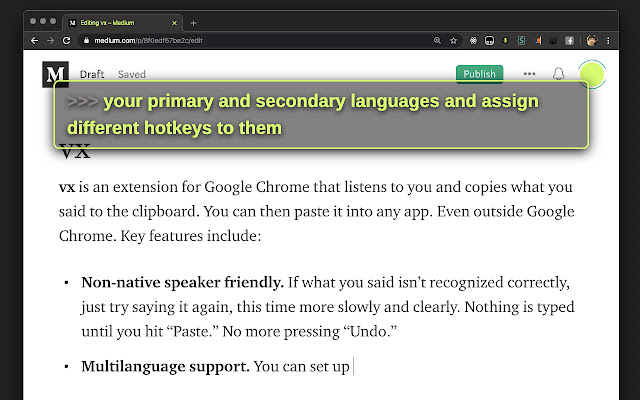
This extension listens to you and copies what you said to the clipboard.
An extension that listens to you and copies what you said to the clipboard.
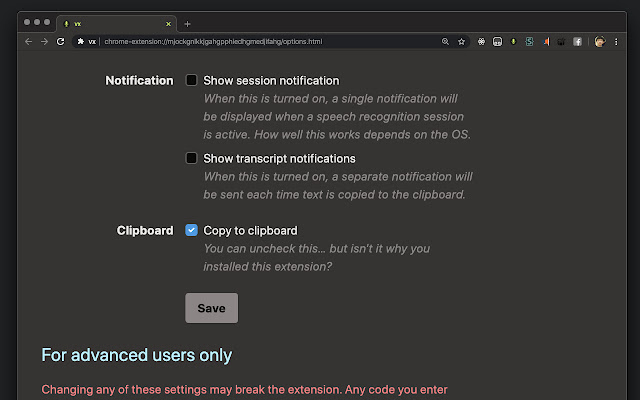
Copy to Clipboard
・ Unlike other “voice typing” extensions, vx only copies what you said to the clipboard.
・ Therefore, it works with all apps that lets you paste text; not just Google Chrome.
・ If the speech recognizer did not get it right, just say the phrase again (more slowly and clearly).
・ This makes it convenient for non-native speakers, not having to press the undo every time.
・ Some early users reported having 2x productivity over conventional voice typing solutions (such as the built-in Dictation that comes with macOS).
Language Support
・ Uses Google’s Web Speech API to do the speech recognition.
・ It supports at least 60 language and 101 dialects.
Bilingual Users Friendly
・ You can set up your “primary language” and “secondary language” and assign hotkeys to each language.
Display Output
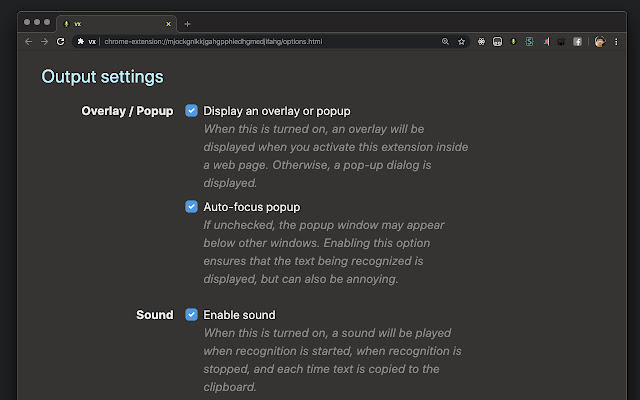
・ vx displays the recognized text as you speak in a webpage or in a popup window. Can be enabled/disabled.
Notification Output
・ vx can display a notification when text is copied to the clipboard. Can be enabled/disabled.
Sound Feedback
・ vx emits a sound when the speech recognition session begins and ends, as well as when text is copied to the clipboard. Can be enabled/disabled.
Permissions
・ vx doesn’t require the “Read and change all your data on the websites you visit” permission.
・ vx doesn’t require the “Communicate with cooperating websites” permission.
・ vx requires microphone, clipboard, and notification access.
Totally Free
・ There is no paid version.
・ No support is provided for this extension either.
・ If you encounter any issue, the source code is available for you to build and debug yourself at https://github.com/dtinth/vxchrome.
Advanced Features for People Who Knows JavaScript
・ You can supply a custom JavaScript code to process the transcript before it’s being copied to the clipboard (a “custom transcript filter”).
・ You can also supply a custom JavaScript code to send the processed transcript elsewhere (a “custom output module”).
・ If you know JavaScript, this extension is essentially doing this: ((r = new webkitSpeechRecognition(), o = copy) => (r.lang = ‘en’, r.onresult = e => (x => (console.log(x), o(x)))(Array.from(e.results).map(r => r[0].transcript).join(”)), r.start()))() // (you can run it in Chrome DevTools)
MIT License
Copyright (c) 2020 dtinth
Permission is hereby granted, free of charge, to any person obtaining a copy
of this software and associated documentation files (the “Software”), to deal
in the Software without restriction, including without limitation the rights
to use, copy, modify, merge, publish, distribute, sublicense, and/or sell
copies of the Software, and to permit persons to whom the Software is
furnished to do so, subject to the following conditions:
The above copyright notice and this permission notice shall be included in all
copies or substantial portions of the Software.
THE SOFTWARE IS PROVIDED “AS IS”, WITHOUT WARRANTY OF ANY KIND, EXPRESS OR
IMPLIED, INCLUDING BUT NOT LIMITED TO THE WARRANTIES OF MERCHANTABILITY,
FITNESS FOR A PARTICULAR PURPOSE AND NONINFRINGEMENT. IN NO EVENT SHALL THE
AUTHORS OR COPYRIGHT HOLDERS BE LIABLE FOR ANY CLAIM, DAMAGES OR OTHER
LIABILITY, WHETHER IN AN ACTION OF CONTRACT, TORT OR OTHERWISE, ARISING FROM,
OUT OF OR IN CONNECTION WITH THE SOFTWARE OR THE USE OR OTHER DEALINGS IN THE
SOFTWARE.
In conclusion, the process for modifying our browser’s behaviour to add the word count feature is unbelievably simple. In this regard, an extension not only solves a problem that we have but also adds a greater degree of functionality to the experience of using an Edge browser. If you have any problem with VX Add-ons install feel free to comment below next reply to answer this question.
Technical Information
| Version: | 0.5.2 |
|---|---|
| File size: | 320KiB |
| Language: | English |
| Copyright: | dtinth |