Checksub – Custom Subtitles
By Checksub
No Rating Available.
Download and install the CHECKSUB extension 0.0.0.1 for Microsoft edge store. Also, CHECKSUB addons is very helpful for every computer and mobile users Users.

Screenshots:
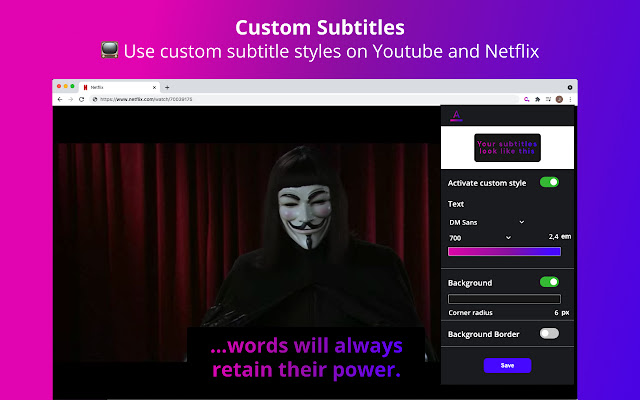

Checksub – Custom Subtitles extension for Edge
CHECKSUB Extension For Microsoft Edge you can help quality browser using. Day by Day, increase user Microsoft Edge. This guide will help you to download CHECKSUB extension 0.0.0.1 on their website. Anyway, CHECKSUB is developed by CHECKSUB. First, you must download their Edge browser then this guide will help to install on their browser through the extension.
In the event that you have wanted to download an extension onto the latest version of Microsoft Edge, there is a simple and straightforward course of action. The following steps will enable you to download and install any extensions that you might want to use.
Table of Contents
Download CHECKSUB extension for Microsoft Edge
Edgeaddons.com is the most popular Microsoft edge browser an extension free download alternative website. On this website when you can download Extensions no need for any Registration. I think you have a better solution to this website. CHECKSUB is the Productivity category extension in the Microsoft Edge web store.
Anyway, You can understand that how to download the free CHECKSUB extension 0.0.0.1 simply by visiting our website. There are no special technical skills required to save the files on your computer. So what are you waiting for? Go ahead!
CHECKSUB extension Features
???? Custom your subtitles on Youtube and Netflix
???? Create and get personalized subtitles style for Youtube and Netflix! 100% FREE.
Have you ever wanted to personalise your favourite Netflix movie, or all the Youtube video that you watch? Imagine subtitles glowing like a rainbow ???? on a colourful background ????.
Well that’s a bit weird but it is now possible with Checksub’ add-on.
We have created a tool that allow you to custom your subtitles endlessly so you can create easy to read and fun subtitles.
Who is Checksub custom subtitles for?
– If you are fed up to watch your favourite Japanese anime with Arial subtitles and you want a custom font that immerses you in the culture of your hero.
– If you read 9px high subtitles while watching the 2hour latest Korean film masterpiece Parasite.
– If you just want to watch subtitles on your TV, without binoculars.
– Or just to impress your friends with beautiful and custom subtitles.
Then we may have created the perfect subtitling add-on for you!
What can you do with Checksub custom subtitles?
– Custom the font of your captions.
– All fonts available on Google Fonts are supported.
– Create colourful and design subtitles.
– Make sure to create a contrast between the video and subtitles.
– Style the background behind your subtitles.
– Make your subtitles visible on any video and create catchy captions.
– Create subtitles that everyone can read even if you get visual disabilities.
– Increase the size of the text that you read.
– Save different subtitles style to use on contrasting websites.
– Apply your custom subtitles for Netflix or subtitles for YouTube within a click.
If you want to add a new feature to the add-on, drop us a line we will create that for you ????.
In conclusion, the process for modifying our browser’s behavior to add the word count feature is unbelievably simple. In this regard, an extension not only solves a problem that we have but also adds a greater degree of functionality to the experience of using an Edge browser. If you have any problem with CHECKSUB Add-ons install feel free to comment below next replay to answer this question.
Technical Information
| Version: | 0.0.0.1 |
|---|---|
| File size: | 106KiB |
| Language: | English |
| Copyright: | Checksub |