Productivity

Grammarly
Download and install the Grammarly extension 14.1003.0 for Microsoft edge store. Also, Grammarly addons is very helpful for every computer and…

By Easy screenshot team
Directory listing • metadata needs current verificationDownload and install the Easy Screenshot extension 0.4.5 for Microsoft edge store. Also,Easy Screenshot addons is very helpful for every computer and mobile users Users.
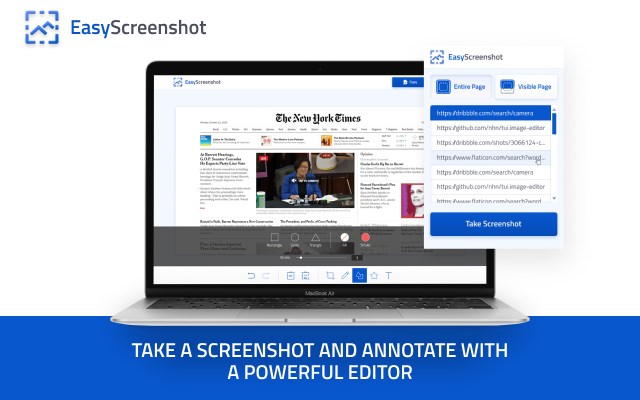
Recently Microsoft Edge is the most popular browser in the world. Also, Easy Screenshot Extension For Microsoft Edge you can help quality browser using. Day by Day, increase user Microsoft Edge. Easy Screenshot allows you to take screenshots of opened pages and edit them with a built-in image editor. This guide will help you to download Easy Screenshot extension 0.4.5 on their website. Anyway, Easy Screenshot is developed by the Easy screenshot team. First, you must download their Edge browser then this guide will help to install on their browser through the extension.
In the event that you have wanted to download an extension onto the latest version of Microsoft Edge, there is a simple and straightforward course of action. The following steps will enable you to download and install any extensions that you might want to use.
Edgeaddons.com is the most popular Microsoft edge browser an extension free download alternative website. On this website when you can download Extensions no need for any Registration. I think you have a better solution to this website. Easy Screenshot is the Productivity category extension in the Microsoft Edge web store.
Anyway, You can understand that how to download the free Easy Screenshot extension 0.4.5 simply by visiting our website. There are no special technical skills required to save the files on your computer. So what are you waiting for? Go ahead!
⭐ Take a full-page screenshot
⭐ Take a visible-part screenshot
⭐ Annotate (Edit) screenshot – crop image, draw figures, add icons, and more
⭐ Copy or Save as a PNG file
First, open up your browser and click on the three lines at the top left of your screen. Next, select “More tools” then “extensions” then “get extensions” then choose an extension to use. Press “Add.” At this point, wait a few minutes. Finally, the Easy Screenshot extension has been installed.
To uninstall an extension, open up your browser, click on the three lines at the top left of your screen, select “more tools,”
then you can see your install extension. Now select and click uninstall button for your install extension. wait a few times, successfully remove your Easy Screenshot extension.
In conclusion, the process for modifying our browser’s behavior to add the word count feature is unbelievably simple. In this regard, an extension not only solves a problem that we have but also adds a greater degree of functionality to the experience of using an Edge browser. If you have any problem with Easy Screenshot Add-ons install feel free to comment below next replay to answer this question.
Directory information may be outdated. Review the current publisher, requested permissions, pricing, reviews and privacy policy on the official store. A listing here is not a security certification or endorsement.
Other listings in related categories. Similarity does not imply equivalent features.
Download and install the Grammarly extension 14.1003.0 for Microsoft edge store. Also, Grammarly addons is very helpful for every computer and…
Download and install the Volume Manager extension 30 for Microsoft edge store. Also, Volume Manager addons is very helpful for every…
Download and install the Speedtest by Ookla extension 1.2.1 for Microsoft edge store. Also, Speedtest by Ookla addons is very helpful…